> For clean Markdown of any page, append .md to the page URL.
> For a complete documentation index, see https://beta-docs.payabli.com/llms.txt.
> For AI client integration (Claude Code, Cursor, etc.), connect to the MCP server at https://beta-docs.payabli.com/_mcp/server.
# ExpressCheckout UI
The ExpressCheckout component lets you embed an express checkout for digital wallets inside your website or application.
## Usage
This component lets you add a robust low-code way to accept payments from a digital wallet to your pages or apps.
> **Info**
>
> See [Library URLs](/developer-guides/embedded-components-overview#library-urls) for important information about embedded components library URLs.
### Step 1: Include the Payabli component
Add the script to the `` element of your HTML.
**`Sandbox`**
```html Sandbox
```
> **Note**
>
> You need to include `` in the `` element of your HTML to prevent problems with special characters such as 'á' or 'ñ'.
### Step 2: Define the component container
Add the container to your HTML. This `
` tag is where the page renders the component. The ID is the identifier for `rootContainer` in your component configuration.
**`Sandbox`**
```html Sandbox
```
### Step 3: Configure the component
Define the component configuration in a script block immediately after `component.js` and create an instance of the component. See the [Configuration](#configuration-reference) section for a full reference of options.
**`Full configuration example`**
```html Full configuration example
```
### Step 4: Style the component
Information about styling embedded components is available in [Embedded Components Overview](/developer-guides/embedded-components-overview#customize-component-styling).
## Configuration reference
These are the configuration parameters available for the ExpressCheckout component.
> **Note**
>
> The component accepts only the data below. If you need to pass more data than what's supported, consider using the [temporary token flow](/developer-guides/tokenization-temporary-flow).
**`type`** `string` — required
This value determines the type of embedded component to render.\
Accepted values are: `methodEmbedded`, `methodLightbox`, `vterminal`, or `expressCheckout`.\
For the ExpressCheckout UI, this value is `expressCheckout`.
See the [Embedded Components Overview](/developer-guides/embedded-components-overview) for more information on other component types.
---
**`rootContainer`** `string` — required
Container ID used for the component.
---
**`token`** `string` — required
API token for authentication. This should be a **public** API token, as described [here](/api-reference/api-overview#authentication#organization-token-most-common).
---
**`entryPoint`** `string` — required
When the API token belongs to an organization, the entrypoint name identifies the target paypoint (merchant).
---
**`customCssUrl`** `string`
Complete URL of a custom CSS stylesheet to use with the component.
---
**`expressCheckout`** `object` — required
Configuration for the express checkout functionality.
#### properties
**`amount`** `number` — required
The amount for the transaction.
---
**`fee`** `number` — required
The fee for the transaction.
---
**`currency`** `string` — required
The currency for the transaction.
---
**`columns`** `object`
Define the number of columns to use for digital wallet display.
---
**`supportedNetworks`** `string[]` — required
Card networks to accept payments from. Suggested options:
* `amex`
* `visa`
* `discover`
* `masterCard`
* `jcb`
---
**`applePay`** `object` — required
#### properties
**`enabled`** `boolean` — required
When `true`, Apple Pay is enabled.
---
**`buttonStyle`** `enum` — default: black
The Apple Pay button style. Supported options:
* “black”: Default black button.
* “white-outline”: White button with an outline.
* “white”: Solid white button.
---
**`buttonType`** `enum` — default: plain
The text on Apple Pay button. Supported options:
| Button Type | Description | Text on Apple Pay Button |
| -------------- | -------------------------------------------------------------------------------------------------------- | ------------------------------ |
| `"plain"` | An Apple Pay button with the Apple Pay logo only, useful when an additional call to action isn't needed. | Apple Pay logo only (no text) |
| `"buy"` | Use this button for product purchases. | Buy with Apple Pay logo |
| `"donate"` | Used by approved nonprofits. Lets people make donations. | Donate with Apple Pay logo |
| `"check-out"` | Use this button for purchase experiences that include other payment buttons that start with "Check out". | Check Out with Apple Pay logo |
| `"book"` | Use this button for booking appointments, flights, or other experiences. | Book with Apple Pay logo |
| `"continue"` | Use this button for general purchases. | Continue with Apple Pay logo |
| `"top-up"` | Use this button for adding money to an account, or payment system. | Top Up with Apple Pay logo |
| `"order"` | Use this button for placing orders for items. | Order with Apple Pay logo |
| `"rent"` | Use this button for renting items such as equipment or cars. | Rent with Apple Pay logo |
| `"support"` | Use this button for helping people give money to projects, causes, organizations, and other entities. | Support with Apple Pay logo |
| `"contribute"` | Use this button to help people give money to projects, causes, organizations, and other entities. | Contribute with Apple Pay logo |
| `"tip"` | Use this button to let people tip for goods or services. | Tip with Apple Pay logo |
| `"pay"` | Use this button for general purchases. | Pay with Apple Pay logo |
---
**`language`** `enum` — default: en-us
The Apple Pay button locale. Supported options:
* **en-US**: English (US)
* **ar-AB**: Arabic
* **ca-ES**: Catalan
* **zh-CN**: Chinese (China)
* **zh-HK**: Chinese (Hong Kong)
* **zh-TW**: Chinese (Taiwan)
* **hr-HR**: Croatian
* **cs-CZ**: Czech
* **da-DK**: Danish
* **de-DE**: German
* **nl-NL**: Dutch
* **en-AU**: English (Australia)
* **en-GB**: English (UK)
* **fi-FI**: Finnish
* **fr-CA**: French (Canada)
* **fr-FR**: French (France)
* **el-GR**: Greek
* **he-IL**: Hebrew
* **hi-IN**: Hindi
* **hu-HU**: Hungarian
* **id-ID**: Indonesian
* **it-IT**: Italian
* **ja-JP**: Japanese
* **ko-KR**: Korean
* **ms-MY**: Malay
* **nb-NO**: Norwegian
* **pl-PL**: Polish
* **pt-BR**: Portuguese (Brazil)
* **pt-PT**: Portuguese (Portugal)
* **ro-RO**: Romanian
* **ru-RU**: Russian
* **sk-SK**: Slovak
* **es-MX**: Spanish (Mexico)
* **es-ES**: Spanish (Spain)
* **sv-SE**: Swedish
* **th-TH**: Thai
* **tr-TR**: Turkish
* **uk-UA**: Ukrainian
* **vi-VN**: Vietnamese
---
---
**`requiredShippingContactFields`** `boolean`
When this field is `true`, the following fields `["postalAddress", "name", "phoneticName", "phone", "email"]` are required. They will be sent with the payment and can be read through the callbacks.
---
**`appearance`** `object`
#### properties
**`buttonHeight`** `number`
Height of the button.
---
**`buttonBorderRadius`** `number`
Border radius of the button.
---
**`padding`** `object`
#### properties
**`x`** `number`
Horizontal padding.
---
**`y`** `number`
Vertical padding.
---
---
---
---
**`customerData`** `object` — required
#### properties
**`customerNumber`** `string` — required
Customer's identification number.
---
**`firstName`** `string` — required
Customer's first name.
---
**`lastName`** `string` — required
Customer's last name.
---
**`billingEmail`** `string` — required
Customer's billing email address.
---
---
**`functionCallBackReady`** `function`
Triggered when the ExpressCheckout component is ready to use.
---
**`functionCallBackSuccess`** `function`
Triggered upon successful completion of a digital wallet transaction.
---
**`functionCallBackError`** `function`
Triggered if an error occurs during the digital wallet transaction.
---
**`functionCallBackCancel`** `function`
Triggered if the user cancels the digital wallet transaction.
---
## Response examples
### functionCallbackReady response
This response is triggered when the component is ready to use.
```json
{
applePay: true,
googlePay: false
}
```
**`applePay`** `boolean`
When `true`, the component is ready to accept Apple Pay.
---
**`googlePay`** `boolean`
Not in use yet.
---
### functionCallbackSuccess response
When a transaction is successfully completed via the ExpressCheckout component, the functionCallBackSuccess response is triggered.
> **Check**
>
> In the response, the `referenceId` is the transaction ID you can use for other operations.
```json
{
"data": {
"isSuccess": true,
"pageIdentifier": "t.XMzKRgtV6eJrI2Fsn45RLKuRujHi53qDnsizyJXNM7ChdejoRNOdb0Dm7VXQ3H/aBVMu+14IB9sOS1hbZF/kXMKgUY94nspVI+mRSphe8HeSwbr5OxLUSmu0Uuc6RmDzaLUYXn8eDr…",
"responseData": {
"authCode": "",
"avsResponseText": null,
"billingContact": {
"addressLines": [
"9425 SW 172nd Pl"
],
"administrativeArea": "FL",
"country": "United States",
"countryCode": "US",
"familyName": "Martinez",
"givenName": "Fernando",
"locality": "Miami",
"phoneticFamilyName": "",
"phoneticGivenName": "",
"postalCode": "33197",
"subAdministrativeArea": "",
"subLocality": ""
},
"customerId": 6886,
"cvvResponseText": null,
"methodReferenceId": null,
"referenceId": "1148-2305e2cb80eb5969920f2cf9f2565455",
"resultCode": 1,
"resultText": "Approved",
"shippingContact": {
"addressLines": [
"9425 SW 172nd Pl"
],
"administrativeArea": "FL",
"country": "United States",
"countryCode": "US",
"emailAddress": "fernandotest@payabli.com",
"familyName": "Martinez",
"givenName": "Fernando",
"locality": "Miami",
"phoneNumber": "4089752020",
"phoneticFamilyName": "4192412942195",
"phoneticGivenName": "941924129412943",
"postalCode": "33197",
"subAdministrativeArea": "",
"subLocality": ""
}
},
"responseText": "Success"
},
"paymentMethod": "apple_pay"
}
```
**`responseText`** `string`
"Success" or "Declined"
---
**`responseData`** `object`
Container for response details.
#### properties
**`responseData.authCode`** `string`
Authorization code for payments.
---
**`responseData.referenceId`** `string`
Identifier for the transaction (for payments) or the stored payment method (for save payment method).
---
**`responseData.resultCode`** `integer`
Result of operation. 1 is success, 2 is declined, and 3 is error.
---
**`responseData.resultText`** `string`
Message related the result. If the operation was successful, it returns "Added"/"Approved". If there was an error, it returns error details.
---
**`responseData.customerId`** `integer`
ID for the customer owner of payment.
---
**`responseData.avsResponseText`** `string`
Text code describing the result for address validation.
---
**`responseData.cvvResponseText`** `string`
Text code describing the result for CVV validation.
---
**`responseData.methodReferenceId`** `string`
The stored method's identifier (sometimes referred to as 'token') in Payabli. When `null`, the method wasn't created, or doesn't exist, depending on the operation performed.
---
**`responseData.billingContact`** `object`
The billing contact information.
#### properties
**`addressLines`** `array`
The street portion of the address for the contact. For example: 123 Main Street.
---
**`administrativeArea`** `string`
The contact's state. For example, CA.
---
**`country`** `string`
Billing country.
---
**`countryCode`** `string`
The contact's ISO 3166 country code.
---
**`emailAddress`** `string`
The contact's email address.
---
**`familyName`** `string`
The contact's family name, also known as last name.
---
**`givenName`** `string`
The contact's given name, also known as first name.
---
**`locality`** `string`
The contact's city. For example, Los Angeles.
---
**`phoneticFamilyName`** `string`
Specifies the pronunciation of the contact's last name.
---
**`phoneticGivenName`** `string`
Specifies the pronunciation of the contact's first name.
---
**`postalCode`** `string`
The contact's postal code.
---
**`subAdministrativeArea`** `string`
The contact's county or other region.
---
**`subLocality`** `string`
Additional information associated with the contact's address.
---
---
**`responseData.shippingContact`** `object`
Shipping address and contact information for the transaction.
#### properties
**`addressLines`** `array`
The street portion of the address for the contact. For example: 123 Main Street.
---
**`administrativeArea`** `string`
The contact's state. For example, CA.
---
**`country`** `string`
Billing country.
---
**`countryCode`** `string`
The contact's ISO 3166 country code.
---
**`emailAddress`** `string`
The contact's email address.
---
**`familyName`** `string`
The contact's family name, also known as last name.
---
**`givenName`** `string`
The contact's given name, also known as first name.
---
**`locality`** `string`
The contact's city. For example, Los Angeles.
---
**`phoneNumber`** `string`
The contact's phone number.
---
**`phoneticFamilyName`** `string`
Specifies the pronunciation of the contact's last name.
---
**`phoneticGivenName`** `string`
Specifies the pronunciation of the contact's first name.
---
**`postalCode`** `string`
The contact's postal code.
---
**`subAdministrativeArea`** `string`
The contact's county or other region.
---
**`subLocality`** `string`
Additional information associated with the contact's address.
---
---
---
**`isSuccess`** `boolean`
Boolean indicating whether the operation was successful. A `true` value indicates success. A `false` value indicates failure.
---
**`pageIdentifier`** `string`
Auxiliary validation used by Payabli in payment pages and components.
---
**`paymentMethod`** `string`
The payment method used. Possible values include "apple_pay", "google_pay", etc.
---
### functionCallBackError response
This response is triggered if an error occurs during the transaction.
```json
{
"paymentMethod": "apple_pay", // apple_pay, google_pay etc
"error": {
"isSuccess": false
"pageIdentifier": null,
"responseCode": 5005,
"responseData": {
"explanation": string,
"todoAction": string
},
"responseText": string,
roomId: null
}
}
```
**`paymentMethod`** `string`
The payment method used. Possible values include "apple_pay", "google_pay", etc.
---
**`error`** `object`
Container for error details when an error occurs.
#### properties
**`isSuccess`** `boolean`
Indicates whether the operation was successful. In error cases, this will be false.
---
**`pageIdentifier`** `string`
Auxiliary validation used by Payabli in payment pages and components.
---
**`responseCode`** `number`
The error code. For example, 5005. See [API responseCode and resultCode Reference](/api-reference/api-responses) for a full list of error codes.
---
**`responseData`** `object`
Additional details about the error.
#### properties
**`explanation`** `string`
A detailed explanation of the error.
---
**`todoAction`** `string`
Suggested action to resolve the error.
---
---
**`responseText`** `string`
A brief description of the error.
---
**`roomId`** `number`
Internal field used by Payabli.
---
---
### functionCallBackCancel response
This response is triggered when the user cancels the transaction while the modal is shown.
```json
{
data: {
isTrusted: true
},
paymentMethod: "apple_pay"
}
```
**`data`** `object`
Container for response data.
#### properties
**`isTrusted`** `boolean`
In this field, `true` indicates that the event was triggered by a user action, such as a user manually canceling the payment process.
---
---
**`paymentMethod`** `string`
The digital wallet method used. Currently, only `apple_pay` is supported.
---
## Combine components
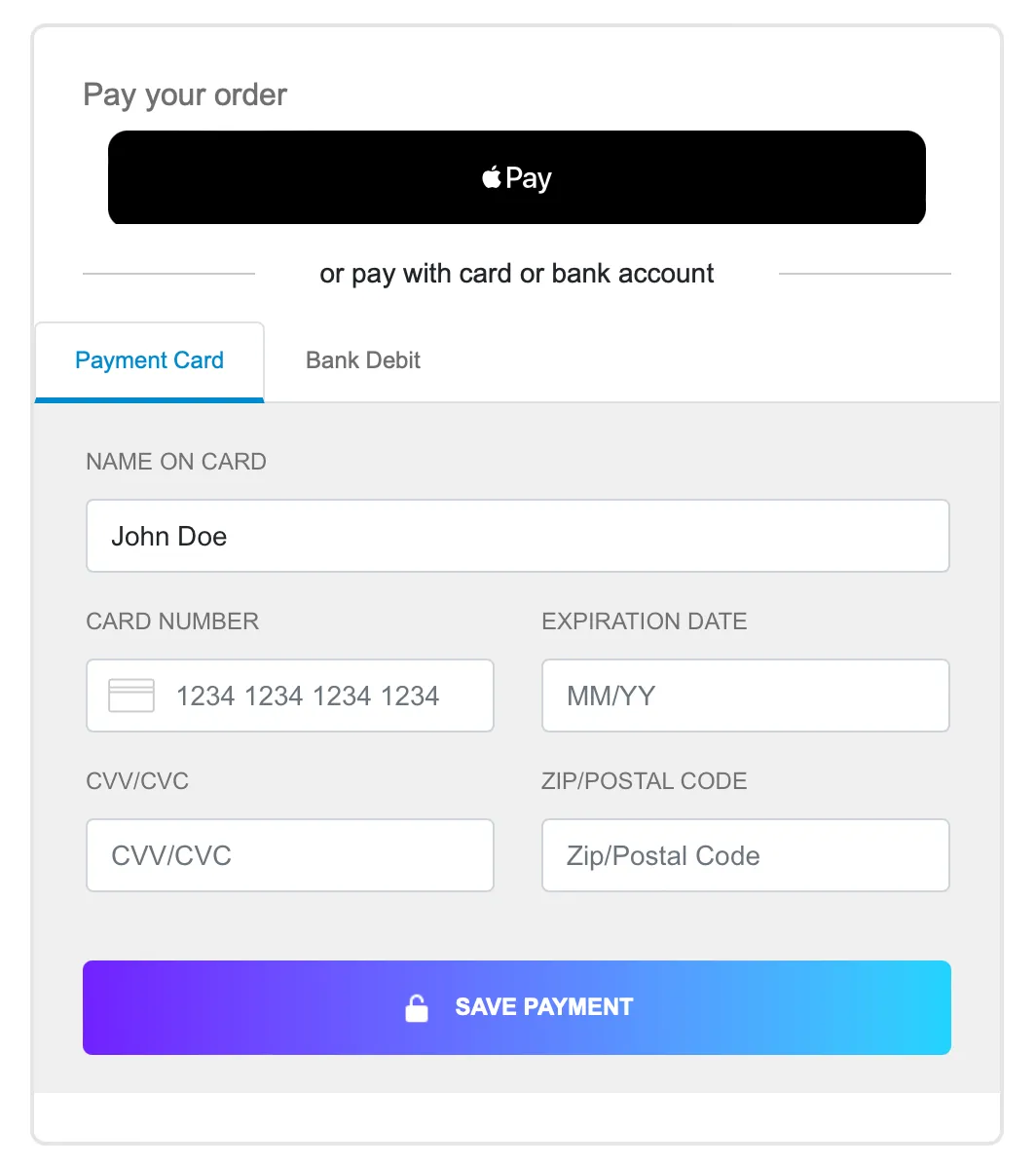
If you want to accept digital wallet payments along with card or ACH payments, you can load both the [EmbeddedMethod UI](developer-guides/embedded-components-embeddedmethodui) and ExpressCheckout UI components on the same webpage. You can also use `updateConfig` to switch between component configurations on your page.
The code example renders the components in this image:

**`ExpressCheckout, ACH, and Card example`**
```html ExpressCheckout, ACH, and Card example